Usage Guide#
massphoto turns camera movies into tables of single-molecule landing events. The top-level API provides a complete analysis pipeline while the underlying functions remain accessible in the domain namespaces. This guide explains the analysis workflow, the available entry points, and how to adjust settings for your data.
Use this guide to understand the data, choose an entry point, and decide what to adjust. The examples contain the runnable workflows, sample data, and plots.
Choose a starting point#
Depending on your goal, start with one of the two primary workflows:
Calibrate an instrument: If you have standard proteins (e.g. BSA, MFP1) and need to determine contrast-to-mass conversion factors, follow the calibration workflow.
Measure an unknown sample: If you already have calibration parameters, follow the mass distribution workflow.
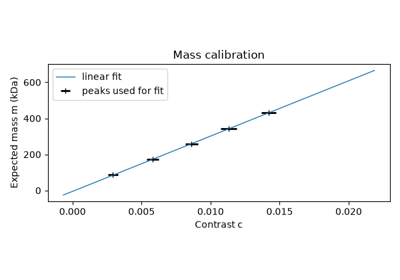
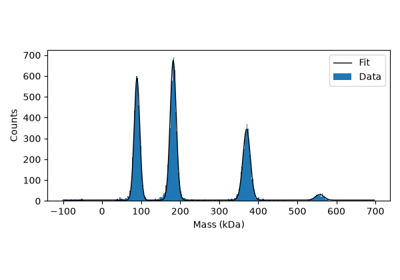
A calibration is specific to your instrument and measurement conditions. Example coefficients and filtering thresholds illustrate a workflow; they are not universal settings.
What happens to a movie#
Raw mass photometry images contain a strong, spatially patterned background caused by the scattered light from the coverglass-water interface. The usual analysis looks for the small intensity changes associated with particles binding to or detaching from the surface:
Reveal changes. Ratiometric processing compares temporal averages before and after each frame to suppress the static background. Optional drift correction aligns the raw images before this comparison.
Find candidates. The default detector combines temporal step correlation, spatial PSF correlation, and a contrast threshold. Detection selects candidate events; it does not yet provide the final fitted contrast.
Measure each event. Point spread function (PSF) fitting estimates event positions and contrasts from the ratiometric images. Contrast describes an intensity change, rather than a mass.
Calibrate and summarise. A contrast-to-mass calibration converts fitted contrasts to masses. Inspect the event table, select suitable events, and plot or fit the resulting distribution.
massphoto.fit() manages the movie processing, detection, and event
fitting. Its default postprocessing also adds masses when a calibration is set.
Without a calibration, fitted contrasts are still available.
Next, massphoto.distfit.fit() can fit peaks in a
distribution of events, rather than fitting individual event images.
For intermediate images and a walkthrough of each stage, see the step-by-step pipeline.
Choose how much control you need#
After import massphoto as mp, most analyses can stay at the top level.
Domain namespaces group alternative detection strategies, calibration, and
histogram fitting.
Task |
Entry point |
|---|---|
Detect events and fit their PSF images |
|
Detect candidates without PSF fitting |
|
Assemble custom steps in the chunked pipeline |
|
Inspect a movie and its metadata |
|
Work directly with individual processing stages |
|
Choose a detection strategy |
|
Fit or apply a contrast-to-mass calibration |
|
Fit contrast or mass distributions |
massphoto.fit(), massphoto.detect(), and massphoto.process() accept a file path or a movie array with axes (frames, y, x) and
manage chunked processing. You can replace detection_func or fit_func in massphoto.fit()
without assembling the whole pipeline yourself. The
custom detection example
shows this extension point in use.
Settings that affect the result#
Most users will use the massphoto.fit() entry point. The defaults are tuned for typical mass photometry movies, but you
may need to adjust them for your data. The following settings are most commonly needed:
Averaging and detection. ratiometric_args configures background
subtraction; detection_args configures candidate selection; fit_args
configures event fitting.
The averaging window navg trades shot-noise suppression (\(\text{SNR} \propto \sqrt{n_\text{avg}}\))
against temporal resolution: shorter windows allow for a higher density of events,
while longer windows can improve signal-to-noise.
The default detector (event_correlation_step()) applies
three thresholds [step_corr, norm_corr, contrast] (default [0.6, 0.5, 0.001]):
temporal step correlation on the native movie, normalised spatial correlation with
the PSF template, and raw ratiometric contrast.
Use the mass distribution example
for parameter adjustments, and the
shot noise example
for the relationship between averaging and noise.
For experimental guidelines and recommended settings, see
Kratochvíl et al. (2025).
Image corrections and diagnostics. movie_correct_drift=True compensates for lateral
motion before ratiometric processing; the
drift correction example
shows how to inspect that motion. Frame-level quality diagnostics (intensity,
sharpness, signal, and drift speed) can be tracked over time with compute_movie_metrics=True,
as demonstrated in the
movie properties example.
Illumination correction, enabled by default
in massphoto.calc_ratiometric(), accounts for spatial variation in the
illumination and background when estimating contrast. These corrections address
different sources of artefacts often encountered in mass photometry.
PSF and mass calibration. The PSF model describes the event image and is used to estimate the contrast. Mass calibration maps the fitted contrast to mass. Changing a mass calibration does not change the PSF model. See the calibration example.
One analysis or many. Explicit arguments apply to one call and take
precedence over stored defaults. mp.defaults holds shared settings such as
calibration; mp.defaults.context(...) applies temporary settings and restores
them afterwards. Defaults may be global (navg) or function-specific
(event_correlation_step.thresholds); function-specific keys take precedence
over global keys. See Managing Defaults for configuration examples and lookup
rules.
Understand the event table#
mp.fit returns a pandas DataFrame with one row per fitted event. Select
columns, filter rows, and combine results using normal pandas operations.
Columns |
Meaning |
|---|---|
|
Event frame and position in the movie. |
|
Contrast estimated by fitting the event image. |
|
Contrast standard error and fit quality, when provided by the fitting method. |
|
Calibrated mass, when a mass calibration is available. |
|
Propagated contrast uncertainty in mass units, when contrast error and a calibration derivative are available. |
Inspect both selected and unfiltered distributions when choosing quality filters: removing events changes the population being analysed and might introduce bias. The mass uncertainty column propagates contrast error; it does not include uncertainty in the calibration coefficients.
To filter out poor fits and high-uncertainty events before distribution fitting:
# Quality filtering (e.g. fit quality R² and mass uncertainty)
events_filtered = events.query("r2_fit > 0.6 and masses_kDa_se < 5.0")
Keep analyses reproducible#
mp.fit, mp.detect, and mp.process attach an analysis_record to
DataFrame.attrs by default. massphoto.resolve_record() creates a replay
callable using the recorded pipeline settings that lets you reproduce the analysis
on the same or a different movie. Follow the
analysis record and replay example
for inspecting, replaying, and saving a record.