Note
Go to the end to download the full example code.
Analysis record and replay#
Every call to massphoto.fit(), massphoto.detect(), and
massphoto.process() automatically attaches an analysis record to the
returned DataFrame. This tutorial shows how to:
Run an analysis with custom parameters on one movie.
Inspect the attached
analysis_record.Resolve the record into a replay callable and apply it to a second movie.
See also
Mass distribution example for details on custom detection and fitting parameters.
Analysis Record and Reproducibility section in the usage guide.
Record once, replay on another movie#
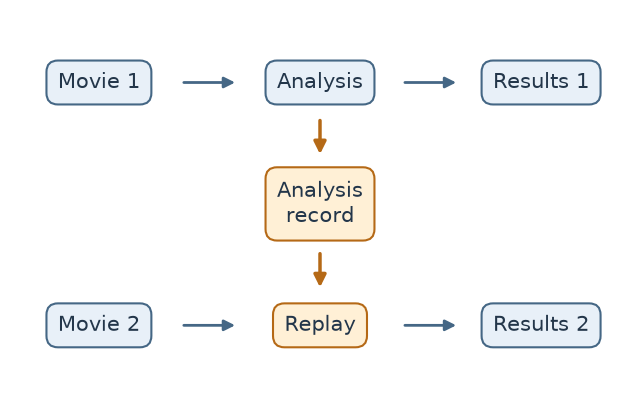
An analysis record captures the settings used for Movie 1. Replay applies those settings to Movie 2, producing a separate results table for the new data. The orange path shows how the settings pass between the two analyses.
Imports#
We first import necessary packages and modules.
Download example data#
This tutorial uses two short movies from Zenodo: a calibration movie
(005_mfp1_500x.mp) and a dynamin movie (006_dynamin_6.mp). We analyse
the calibration movie with custom parameters and replay the same analysis on
the dynamin movie.
downloader = ZenodoZipDownloader(doi="10.5281/zenodo.15800729", download_dir="example_data")

files_calib = downloader.download(inner_pattern="005_mfp1_500x.mp")
files_dynamin = downloader.download("Figure 2.zip/006_dynamin_6.mp")

if not files_calib or not files_dynamin:
    raise RuntimeError(
        "Failed to download example data. Please download it manually from https://zenodo.org/record/15800729."
    )

path_movie_1 = files_calib[0]
path_movie_2 = files_dynamin[0]

print(f"Movie 1 (calibration): {path_movie_1}")
print(f"Movie 2 (dynamin)    : {path_movie_2}")
Movie 1 (calibration): /home/runner/work/massphoto/massphoto/docs/source/_examples/example_data/005_mfp1_500x.mp
Movie 2 (dynamin)    : /home/runner/work/massphoto/massphoto/docs/source/_examples/example_data/006_dynamin_6.mp
Analyse Movie 1 with custom parameters#
We run massphoto.fit() with a shorter averaging window and lower
detection thresholds. The analysis_record is attached to the result
DataFrame by default (attach_record=True).
# Disable progress bars for cleaner output in this tutorial
mp.defaults.set("progress_bar", False)

movie_1, _ = mp.read_movie(path_movie_1)

fitres_1 = mp.fit(
    movie_1,
    ratiometric_args={"navg": 4},
    detection_args={
        "thresholds": [0.5, 0.4, 0.001],
        "correlation_step_args": {"navg": 10},
    },
    movie_correct_drift=True,
)

fitres_1[["frame", "x", "y", "contrasts"]].head()
Inspect the analysis record#
The record is stored in DataFrame.attrs under the key
"analysis_record". Schema version 2 records the origin (fit, detect,
or process), captured call kwargs, a snapshot of massphoto.defaults,
and basic movie metadata. Replay requires the movie and any precomputed events
again.
record = fitres_1.attrs["analysis_record"]

print("schema     :", record["schema_version"])
print("origin     :", record["origin"])
print("movie_info :", record["movie_info"])
schema     : 2
origin     : fit
movie_info : {'shape': (14949, 59, 150), 'dtype': 'uint16'}
The origin_kwargs entry captures effective arguments to massphoto.fit(),
including resolved defaults, while excluding the movie and precomputed events.
origin_kwargs:
{'attach_record': True,
 'chunk_overlap': -1,
 'chunk_size': 1000,
 'compute_movie_metrics': False,
 'detection_args': {'correlation_step_args': {'navg': 10},
                    'thresholds': [0.5, 0.4, 0.001]},
 'detection_func': <function event_correlation_step at 0x7f1fc9d80360>,
 'fit_args': None,
 'fit_func': <function fit_event at 0x7f1fc5ead080>,
 'movie_correct_drift': True,
 'movie_normalize_frame_means': False,
 'movie_template': None,
 'postprocess': (<function apply at 0x7f1fc5eac220>,),
 'progress_bar': False,
 'ratiometric_args': {'navg': 4},
 'ratiometric_func': <function calc_ratiometric at 0x7f1fca083ba0>,
 'return_ratiometric': False,
 'scheduler': None}
defaults_state is a full snapshot of massphoto.defaults at the time the
analysis ran — including any package-wide settings such as PSF parameters or
mass calibration. Here we just confirm the key is present:
print(f"\ndefaults_state: {len(record['defaults_state'])} keys")
defaults_state: 45 keys
Replay the analysis on Movie 2#
massphoto.resolve_record() converts the stored record into:
defaults_overrides: the merged defaults state (defaults snapshot + origin kwargs) that will reproduce the run.replay: a defaults-wrappedmassphoto.fit()callable preloaded with the stored state. Only the new movie needs to be supplied.
overrides, replay = mp.resolve_record(fitres_1)

movie_2, _ = mp.read_movie(path_movie_2)
fitres_2 = replay(movie_2)

fitres_2[["frame", "x", "y", "contrasts"]].head()
Confirm that the same custom parameters were used.
record_2 = fitres_2.attrs["analysis_record"]
print("Replayed origin_kwargs match original:", record_2["origin_kwargs"] == record["origin_kwargs"])
Replayed origin_kwargs match original: True
Persistence note#
DataFrame.attrs is an in-memory dictionary. Tabular exports such as CSV,
XLSX, and DataFrame.to_hdf do not preserve it. To save the DataFrame
together with its attrs (including analysis_record and
frame_metrics), use pandas.DataFrame.to_pickle() and
pandas.read_pickle():
import pandas as pd

fitres_1.to_pickle("fitres.pkl")
loaded = pd.read_pickle("fitres.pkl")
_, replay = mp.resolve_record(loaded)
fitres_replayed = replay(movie_1)
If you export the event table to another format and want to preserve the record, save the record dictionary alongside the data explicitly:
import pickle

# Save the record separately
with open("fitres_record.pkl", "wb") as f:
    pickle.dump(fitres_1.attrs["analysis_record"], f)

# Later, load and replay
with open("fitres_record.pkl", "rb") as f:
    saved_record = pickle.load(f)

_, replay = mp.resolve_record(saved_record)
fitres_replayed = replay(movie_1)
To opt out of attaching the record entirely, pass attach_record=False:
Total running time of the script: (0 minutes 56.149 seconds)